Gmail 2 step authentication is a security measure that greatly reduces the hackability of your gmail account. But it's also a but of a pain as several items (like the password you enter in your iphone) are no longer your password, but an "application specific password" that google creates for you.
In order to get your application specific password, you need to log on to your google account and go here:
https://www.google.com/accounts/IssuedAuthSubTokens
From there, you'll be able to get your application specific password for entering into different locations that need your gmail password after you've enabled 2 step authentication.
Showing posts with label token. Show all posts
Showing posts with label token. Show all posts
Thursday, October 11, 2012

Thursday, May 29, 2008
ESM: Public folder says "the token supplied to the function is invalid"
I was creating a mail enabled public folder today, and I had to go into ESM, right click on it and check it out, but I got this error:
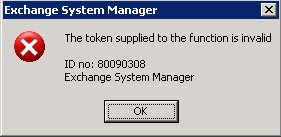
After some research, apparently it has something to do with the SSL cert. Anyway, this was the solution:
Remove SSL from the Exadmin virtual root in IIS:

After some research, apparently it has something to do with the SSL cert. Anyway, this was the solution:
Remove SSL from the Exadmin virtual root in IIS:
| 1. | Click Start, point to Programs, click Administrative Tools, and then click Internet Services Manager. |
| 2. | Click your server, and then expand the Web site that contains the Exadmin virtual root (the default Web site is "Default Web Site"). |
| 3. | Right-click Exadmin, and then click Properties. |
| 4. | Click the Directory Security tab. |
| 5. | Under Secure Communications, click Edit. |
| 6. | Click to clear the Require secure channel (SSL) check box. If Require 128-bit encryption is shaded, click to select Require secure channel (SSL), click to clear Require 128-bit encryption, and then click to clear the Require secure channel (SSL) check box again. |
| 7. | Click OK two times. |
| 8. | Restart Exchange System Manager. |
Subscribe to:
Posts (Atom)