I'm running the latest driver (as of 6/29/15) of the Intel 7265-AC wireless card. As of this writing, it's 17.16.0.4. Oddly, the connection to the Unifi access points (Unifi-AC and standard Unifi access points) drops intermittently. I still have an IP address, but I can't ping anything on the network.
My fix at this point is:
Ad Hoc QoS Mode - WMM Enabled
HT mode - HT Mode
U-APSD support - Disabled
I'm testing this fix (documenting what I've seen here):
http://blog.benkonicek.com/2014/10/24/fixing-the-intel-wireless-n-7260-connection-issues/
(this is where I got most of the info from)
Showing posts with label Intel. Show all posts
Showing posts with label Intel. Show all posts
Monday, June 29, 2015

Saturday, January 3, 2015
Intel cloning tool for future clones
I wrote about using Clonezilla to clone a drive in an upgrade here. The one obstacle was that the cloning mirrored the drive size on the new drive. If the old drive was 128 GB and the new drive was 512 GB, Clonezilla would create a 128 GB partition on the new drive and 384 GB of unallocated space.
For my next clone, I'll try Intel's data migration software:
https://downloadcenter.intel.com/Detail_Desc.aspx?agr=Y&DwnldID=19324
I almost always buy Crucial drives - I don't know if this Intel software will work on the Crucial drives (or if it'll only work on Intel drives), but we'll see. The person who used the Intel software raved about ease of using it.
For my next clone, I'll try Intel's data migration software:
https://downloadcenter.intel.com/Detail_Desc.aspx?agr=Y&DwnldID=19324
I almost always buy Crucial drives - I don't know if this Intel software will work on the Crucial drives (or if it'll only work on Intel drives), but we'll see. The person who used the Intel software raved about ease of using it.
Tuesday, June 9, 2009
dealing with Dell Control Point
On Dell's E series of Latitude laptops, Dell Control Point is installed. It's designed to manage network connections and power settings. Unfortunately, it blows. When setting up an E series laptop yesterday, I found connecting to WLAN and WWAN networks more complex using DCP than traditional means. And they were the only means of controlling WLAN and WWAN connections.
Here's what I did:
I uninstalled Dell Control Point.
The laptop had a Verizon 5720 WWAN card in it. Listed in the downloads for that model of laptop in the communications category was a driver for it - and it included a program for connecting it.
For the Intel WLAN card, I had to go to the downloads section and download a driver for that, too - which of course included the stupid Intel utility, which we know how to disable from here. But as stupid as it was, the Intel driver was already on the laptop (just not the Intel utility and the Windows utility was telling me that another program was controlling it - so I decided to install the Intel utility to tell it to have Windows control the WLAN card). And the Dell driver I downloaded was older than the driver already on the laptop. So I had to go to the Intel site to download the driver - and then I was able to download it and then set it to have Windows manage the WIFI.
That's how I got rid of Dell Control Point.
Monday, June 1, 2009
How to use Windows to manage Wi-Fi instead of Intel utility
If you have an Intel wireless adapter, it may be that the Intel wireless utility is controlling which wireless networks. I always prefer the Windows utility. Here is how you change that.
Double click on the icon below
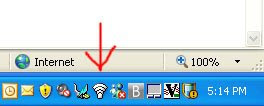
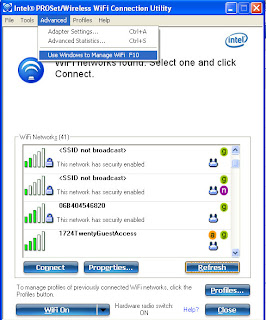
Then choose Advanced -> Use Windows to Manage WiFi.
Subscribe to:
Posts (Atom)