Showing posts with label SBS 2003. Show all posts

Friday, September 23, 2011

sending over port 587 with SSL on SBS 2003

When configuring external users to send over port 587 on Exchange/SBS 2003 - in the scenario that you have users that need to POP the server for whatever reason - here is what I think is the best way to do it:

In Exchange System Manager, go to Servers -> Server Name -> Protocols -> SMTP -> Default SMTP Virtual Server

Right click on the Default SMTP virtual server and choose properties.

Click on advanced and click add. Enter 587 in the TCP port and hit OK. It'll look like this when done:
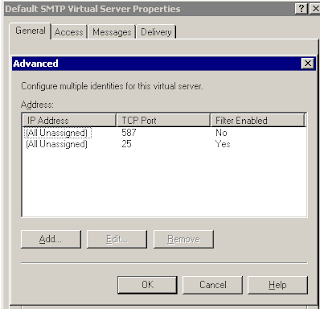
Click on the access tab. Click on Certificate.

Put your existing 3rd party SSL certificate in place on this virtual server. This must be a 3rd part SSL certificate (like godaddy).

And that's it.

When configuring the email client, tell it to use authentication and SSL over port 587. In Outlook 2007, use AUTO for the type of encryption.


Thursday, February 18, 2010

notes on SBS 2008 upgrade

I did my first SBS 2008 upgrade from SBS 2003 this week - and it was surprisingly easy - though time consuming. Here are my thoughts on it:
  • the Microsoft SBS 2008 migration demo is generally excellent and following it is a MUST. It is here
  • After you create the answer file and stick it on a flash drive, you can start the installation using regular non-migration means (in my case, I used the Dell OpenManage CD to start the SBS 2008 installation). There's no real indication that you're doing a migration until you're quite a bit into the process. It doesn't really prompt you for a migration, it just starts doing it when it sees the answer file part of the way into the process
  • After it detected the answer file and began doing the install, it said "this process may take 30 minutes or more" - it took 2.5 hours. Of note the machine I was installing on was a Dell PowerEdge T310 with 12 GB of RAM, a Xeon X3450 processor at 2.66 Ghz, and 7200 RPM drives
  • the mailbox migration took 11.5 hours - going from a 3 Ghz Xeon something with 3 GB of RAM, and 7200 RPM drives to the aforementioned PowerEdge T310. Amazingly, it was only 44 mailboxes and 18 GB of data. I saw a reference to someone else who migrated 57 mailboxes with 50 GB of data in 3 hours 20 minutes.
There are some other parts to it - like the potential necessity of having to change your SSL certificate (the default is remote.domain.com). You are also required to use a certain set of IP addresses - either 10.X.Y.Z or 192.168.Y.Z or 172.X.Y.Z.

Overall, things went great. I'll post more notes when I do my next migration.

Monday, July 6, 2009

SBS 2003 licenses disappear after reboot

A couple times, I have seen SBS 2003 licenses disappear after a reboot. You're only left with the original 5 licenses. The consensus seems to be that antivirus scanning the licensing files is the cause. However, in this case, the license files were already immune from scanning. Anyway, here is a way to fix this issue:

1. Look for licstr.cpa & Autolicstr.cpa files under c:\windows\system32 folder.
2. Exclude these two files from being scanned by Anti Virus.
3. Make a backup copy of both the files on a different folder.
4. Delete licstr.cpa from c:\windows\system32 folder.
5. Rename autolicstr.cpa file to licstr.cpa.
6. Restart the Licensing Service.
7. Goto Server Management Console -> Licensing & you will have the actual no. of CALS.

Saturday, May 16, 2009

SEP problems on SBS 2003

An associate recommended that I use Symantec Endpoint Protection on by SBS 2003 box as local file anti-virus.  I have done this successfully on a couple servers.  On one particular network, I have an Windows Server 2003 R2 box that hosts the Management Console, and I tried installing the SEP on the SBS box.  I first tried it using the unmanaged version of SEP on the SBS box.  The SBS box froze every time I rebooted it, and I had to cold boot it.  I figured it was that it was the unmanaged part that was the problem.  So today I tried to install it using the managed version.  Same problem.  And unfortunately, I didn't document how I uninstalled SEP.

The server freezes during a standard boot, so that doesn't work.  You can't uninstall it in safe mode (you can get to safe mode via F8 during the bootup process just like any regular Windows machine) becuase the installer service isn't running.

In essence, I went into safe mode, went into msconfig and went into the service tab and removed the Symantec options and rebooted.  Then you can go in regular mode and uninstall SEP.  I presume that will work - what I actually did was go into safe mode and go to msconfig and go into diagnostic startup and then enable all Microsoft services.  This sounds easy and logical, but took several hours of troubleshooting.


Thursday, January 1, 2009

You must be a member of the Domain Admins, Schema Admins, and Enterprise Admins" error when you run the Windows Small Business Server 2003 Setup

During a build of Windows 2003 SBS where I was adding replacing an existing server, I got this error:

You must be a member of the Domain Admins, Schema Admins, and Enterprise Admins"

This comes from the fact the SBS server doesn't think it's the holder of the mater roles for the domain.  This knowledgebase article talks about how to address that problem: