I found this link for how you can forward emails that are spam or phishing that are not caught by the Office365 junk filter for further analysis:
https://technet.microsoft.com/en-us/library/jj200769%28v=exchg.150%29.aspx?f=255&MSPPError=-2147217396
Showing posts with label spam. Show all posts
Showing posts with label spam. Show all posts
Wednesday, October 25, 2017

Tuesday, August 9, 2016
Creating an anti-spoofing rule in Office365
Here's how to create a mail flow rule in Office365 to send spammers who spoof your domain to the online quarantine. These instructions are applicable ass of 8/9/16. Typically, these spoofed messages will go to your users' junk e-mail boxes, but this can still lead to confusion, so we don't want these messages to go to junk e-mail at all.
In the Exchange Admin Center, go to Mail Flow:

Add a new mail flow rule:

Hit More Options near the bottom of the page:

Give the rule a name of "Spoof Check." Tell the rule to apply this rule if sender is outside of the organization and the sender's domain is [your public domain] and do the following: deliver the message to the hosted quarantine.

In the Exchange Admin Center, go to Mail Flow:

Add a new mail flow rule:

Hit More Options near the bottom of the page:

Give the rule a name of "Spoof Check." Tell the rule to apply this rule if sender is outside of the organization and the sender's domain is [your public domain] and do the following: deliver the message to the hosted quarantine.

Thursday, April 16, 2015
Office365 Whitelist and Blacklisting
This is a consolidation of information I've found on blacklisting and whitelisting in Office365:
Whitelisting or blacklisting by IP address:
https://blogger.googleusercontent.com/img/b/R29vZ2xl/AVvXsEhQ_oRstwdgLIv5vRX6VQlGA0QGL4ZcT6-2iEWPnTmyyWeV3iI-LV_4J-64rlxpEQ4VlBbag6HA_STunISwGfyvWvJxDHAh9Rm8g3iiK1wPO29nIZBNK7NpOlkxbmtw3M9COO_lSjb_hNU/s1600/20131125.king.net.office365.howto.whitelist.JPG
Exchange Admin Center -> Protection -> Connection Filter -> connection filtering by IP address
Whitelist by domain name:
http://www.mattwharton.co.uk/2014/08/how-to-whitelist-a-domain-in-office-365-exchange-online.html
or
http://www.office365tipoftheday.com/2013/12/02/whitelist-a-domain-to-bypass-exchange-online-protection-spamfilter/
Exchange Admin Center -> Mail Flow -> Create New Rule -> Bypass spam filtering -> Apply this rule ... if the sender domain is
Powershell configuration:
https://support.microsoft.com/en-us/kb/2545137?wa=wsignin1.0
Whitelisting or blacklisting by IP address:
https://blogger.googleusercontent.com/img/b/R29vZ2xl/AVvXsEhQ_oRstwdgLIv5vRX6VQlGA0QGL4ZcT6-2iEWPnTmyyWeV3iI-LV_4J-64rlxpEQ4VlBbag6HA_STunISwGfyvWvJxDHAh9Rm8g3iiK1wPO29nIZBNK7NpOlkxbmtw3M9COO_lSjb_hNU/s1600/20131125.king.net.office365.howto.whitelist.JPG

Exchange Admin Center -> Protection -> Connection Filter -> connection filtering by IP address
Whitelist by domain name:
http://www.mattwharton.co.uk/2014/08/how-to-whitelist-a-domain-in-office-365-exchange-online.html
or
http://www.office365tipoftheday.com/2013/12/02/whitelist-a-domain-to-bypass-exchange-online-protection-spamfilter/
Exchange Admin Center -> Mail Flow -> Create New Rule -> Bypass spam filtering -> Apply this rule ... if the sender domain is
Powershell configuration:
https://support.microsoft.com/en-us/kb/2545137?wa=wsignin1.0
Thursday, February 14, 2013
spambot on the LAN caused our mail server to get blacklisted - how I handled it
Yesterday, a machine on one of my client's LANs got a virus (particularly the cutwail spambot). The machine began sending out spam which got the LAN's public IP address put on 6 different blacklists which severely compromised the functionality of my Exchange 2010 server on the LAN that served approximately 80 users.
The first thing I wanted to do was identify the compromised computer and clean it. With more than 80 computers on the LAN, I needed a centralized way to do that. Luckily, my Fortigate 60C firewall can spit out a report with that information. Under System -> Config -> Advanced, there was a packet capture widget which could give me what I needed. Here's how I captured all traffic on port 25:

The packet capture file was in PCAP format, which is a Wireshark format. I opened up the file in Wireshark, and I could see (in this case) that 172.16.1.107 (which is not the mail server) was sending a lot of traffic over port 25 to a lot of different locations. This was my culprit. I cleaned the computer using Malwarebytes and then delisted the public IP from the various blacklists it was on.

I'm going to look at options for having all network traffic go out on a different IP than the one that the mail server uses to avoid this in the future. That could be a long term solution to this issue.
The first thing I wanted to do was identify the compromised computer and clean it. With more than 80 computers on the LAN, I needed a centralized way to do that. Luckily, my Fortigate 60C firewall can spit out a report with that information. Under System -> Config -> Advanced, there was a packet capture widget which could give me what I needed. Here's how I captured all traffic on port 25:

The packet capture file was in PCAP format, which is a Wireshark format. I opened up the file in Wireshark, and I could see (in this case) that 172.16.1.107 (which is not the mail server) was sending a lot of traffic over port 25 to a lot of different locations. This was my culprit. I cleaned the computer using Malwarebytes and then delisted the public IP from the various blacklists it was on.

I'm going to look at options for having all network traffic go out on a different IP than the one that the mail server uses to avoid this in the future. That could be a long term solution to this issue.
Sunday, August 21, 2011
configuring VAMSoft ORF anti-spam on an Exchange server
If I was to rank spam software for Exchange servers, I'd rank them this way:
1) Postini and other off-site similar services
3) VAMSoft ORF
However, ORF costs way less. As of August 2011, ORF is $249 for the first year and then $99 each year thereafter. This is for unlimited users.
Also, ORF requires minimal configuration, which I'll go over here.
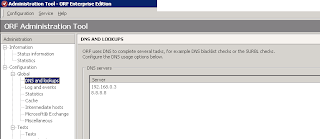
After installing ORF, the first change I make is to add an external DNS server. I add Google's public DNS, 8.8.8.8 as seen here:
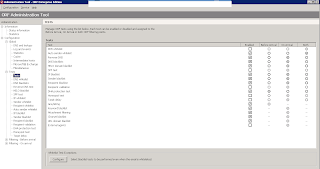
The next thing I do is enable the tests I like. Unfortunately, before I did the installation where I took these screen shots, I didn't track which tests I enabled. It's only three or four tests, but here is a screen shot with all the tests I enabled after I had enabled them:
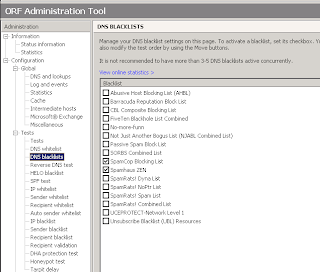
In the test for DNS blacklists, I enable SpamHaus Zen and SpamCop:
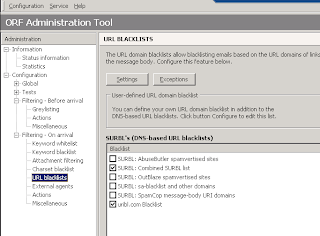
The last change I make is to add URL blacklists. I have it check the combined SURBL list and uribl.com blacklist.
After making those changes, click Configuration -> Save Configuration. Then go to Information -> Status Information and choose Start to start the ORF service.
Separately, I also disable any other spam filters. Almost always, I'm replacing the built in spam features in Exchange. I open Exchange Management Console and go to the various hub transport modules and disable any and all spam tests in the anti-spam tab.
Monday, July 26, 2010
sending spam to junk email folder on Exchange 2007/2010
When configuring actions on detected spam on Exchange 2007 and 2010, there is no option to send it to the junk email folder when configuring it on the EMC. This is absurd. It looks like this (shown here are the actions on the content filter):

As stupid as it is, the way you can configure an SCL to be sent to the junk e-mail folder is through the PowerShell.
This command will send all junk with an SCL of 4 or higher to junk e-mail:
Set-OrganizationConfig -SCLJunkThreshold 4
I put this command on all my Exchange servers. I also disable all outright rejection of spam. Users hate it when legitimate email gets rejected. All spam goes into the junk email folder.
More info on this issue is located here:
http://technet.microsoft.com/en-us/library/bb738127(v=exchg.80).aspx

As stupid as it is, the way you can configure an SCL to be sent to the junk e-mail folder is through the PowerShell.
This command will send all junk with an SCL of 4 or higher to junk e-mail:
Set-OrganizationConfig -SCLJunkThreshold 4
I put this command on all my Exchange servers. I also disable all outright rejection of spam. Users hate it when legitimate email gets rejected. All spam goes into the junk email folder.
More info on this issue is located here:
http://technet.microsoft.com/en-us/library/bb738127(v=exchg.80).aspx
Monday, June 28, 2010
adding anti-spam features to single server Exchange 2010
I built a single Exchange 2010 box, as opposed to one with an edge server - and there were not anti-spam features present. Normally, you'd find the anti-spam features in edge transport in the Exchange Management Console (EMC).
But since there is no edge transport server, you can add the anti-spam functionality (so that it appears in Organization Configuration -> Hub transport and some in Server Configuration -> Hub transport. In each case, there's an anti-spam tab.
To add it, enter these commands:
1. Run the following command from the %system drive%/Program Files\Microsoft\Exchange Server\Scripts folder.
./install-AntispamAgents.ps1
2. After the script has run, restart the Microsoft Exchange Transport service by running the following command.
Restart-Service MSExchangeTransport
But since there is no edge transport server, you can add the anti-spam functionality (so that it appears in Organization Configuration -> Hub transport and some in Server Configuration -> Hub transport. In each case, there's an anti-spam tab.
To add it, enter these commands:
1. Run the following command from the %system drive%/Program Files\Microsoft\Exchange Server\Scripts folder.
./install-AntispamAgents.ps1
2. After the script has run, restart the Microsoft Exchange Transport service by running the following command.
Restart-Service MSExchangeTransport
Thursday, November 19, 2009
adding blacklists to Exchange 2007
IMF in Exchange 2007 is more configurable than in Exchange 2003, but I find it more cumbersome than GFI Mail Essentials, which I love.
For this particular Exchange 2007 server (via SBS 2008), I had users complaining about Microsoft and Facebook spam. Since the IMF updates were not adjusting the content filtering to adjust for these messages, I decided to add black lists. I have hated black lists for years, as I occasionally find myself on them and it's a bitch getting off of them - but conceptually, if the blacklist is accurate with no false positives, it should be a very good tools.
OF NOTE - you should limit your number of blacklists to 3. See this post for more information
To configure it, I opened up Exchange Management Console -> Organization Configuration -> Hub Transport and went to the anti-spam tab. I went into IP block list providers and added these blacklists:
zen.spamhaus.org
list.dsbl.org
combined.njabl.org
bhnc.njabl.org
dnsbl.ahbl.org
Here are some others I could have added:
dnsbl.sorbs.net
bl.spamcop.net
dnsbl-1.uceprotect.net
For this particular Exchange 2007 server (via SBS 2008), I had users complaining about Microsoft and Facebook spam. Since the IMF updates were not adjusting the content filtering to adjust for these messages, I decided to add black lists. I have hated black lists for years, as I occasionally find myself on them and it's a bitch getting off of them - but conceptually, if the blacklist is accurate with no false positives, it should be a very good tools.
OF NOTE - you should limit your number of blacklists to 3. See this post for more information
To configure it, I opened up Exchange Management Console -> Organization Configuration -> Hub Transport and went to the anti-spam tab. I went into IP block list providers and added these blacklists:
zen.spamhaus.org
list.dsbl.org
combined.njabl.org
bhnc.njabl.org
dnsbl.ahbl.org
Here are some others I could have added:
dnsbl.sorbs.net
bl.spamcop.net
dnsbl-1.uceprotect.net
Wednesday, June 24, 2009
why am I getting spam from myself, do I have a virus?
Sometimes, you may see spam where the sender's address is your own. 99.9% of the time, this email did not come from you - but a spammer forging (also known as spoofing) your address. Forging/spoofing is popular among spammers because it can be difficult for some spam filters to deal with.
Unfortunately, email is insecure and very exploitable. The standard for email was designed in the late 60s and early 70s, long before spam and other types of abuse existed or were even thought of. Today, we live with the repercussions of the insecurity and exploitability of the original designs of the email standard. We can't fix the holes/problems without redesigning the email standard and necessarily upgrading every email server on the internet at the same time. It's a monumental and impossible task to upgrade every server at the same time, so we live with the problems.
So what can we do about emails with forged/spoofed senders? The short answer is to upgrade spam filters with those that are capable discering between spoofed and non-spoofed emails. Typically, these filters rely on SPF - but we'll never resolve this problem until SPF becomes required or the standard is redesigned. I'm not holding my breath for that.
Sunday, May 18, 2008
Hundreds of underliverable emails you never sent
This blog entry's goal is to give a lay person's explanation as to why a user might be receiving hundreds of delivery failures for messages that he/she never sent.
Email is insecure and very exploitable. This is a fact. The standard for email was designed in the late 60s and early 70s, long before spam and other types of abuse existed or were even thought of. Today, we live with the repercussions of the insecurity and exploitability of the original designs of the email standard. For more detail on the email standard and why it's exploitable, please see my advanced user's explanation (forthcoming as of 5/18/08).
What's happening is that an unethical spammer somewhere in the world has set up his/her own email server and is sending out spam. The exploitability of email is that this spammer can send out emails with any email address he/she wants. He can use bill.gates@microsoft.com; he can use dave@t-solve.com; he can use tom.brady@newenglandpatriots.com. The spammer can send using any address he/she wants - but the email standard does not require that the spammer be a legitimate sender of that domain. The email standard also does not require that the receiving email server check to see that an email is coming from the legitimate server for that domain.
So the spammer can send emails to anyone he/she wants with YOUR address. He/she can be doing that from his/her house in China, Norway, or next door. We have no control over this because it can be done from anywhere in the world. And this spammer is sending emails potentially with YOUR address (as well as other people's addresses) to other people. This process does not involve your server and is not disallowed in the email standard, so we have no control over it.
In these instances where a user gets several hundred undeliverable emails ... the spammer sends out spams to a random list of email addresses (many of which do not exist). And then the recipient's email server sends a bounceback to the sender's address (your email address) that says "undeliverable - this address does not exist."
So what can be done about this? Not a lot, unfortunately. The spammer is taking advantage of an exploitable part of the email standard. It may be unethical and improper, but it's not preventable.
The standard way to deal with this issue is to ignore the emails. Oftentimes, the spammer will send out 200 to 500 of theses emails over a period of 2 to 5 hours and then stop.
For additional questions on this issue, please email me:
http://www.t-solve.com/contact.html
Email is insecure and very exploitable. This is a fact. The standard for email was designed in the late 60s and early 70s, long before spam and other types of abuse existed or were even thought of. Today, we live with the repercussions of the insecurity and exploitability of the original designs of the email standard. For more detail on the email standard and why it's exploitable, please see my advanced user's explanation (forthcoming as of 5/18/08).
What's happening is that an unethical spammer somewhere in the world has set up his/her own email server and is sending out spam. The exploitability of email is that this spammer can send out emails with any email address he/she wants. He can use bill.gates@microsoft.com; he can use dave@t-solve.com; he can use tom.brady@newenglandpatriots.com. The spammer can send using any address he/she wants - but the email standard does not require that the spammer be a legitimate sender of that domain. The email standard also does not require that the receiving email server check to see that an email is coming from the legitimate server for that domain.
So the spammer can send emails to anyone he/she wants with YOUR address. He/she can be doing that from his/her house in China, Norway, or next door. We have no control over this because it can be done from anywhere in the world. And this spammer is sending emails potentially with YOUR address (as well as other people's addresses) to other people. This process does not involve your server and is not disallowed in the email standard, so we have no control over it.
In these instances where a user gets several hundred undeliverable emails ... the spammer sends out spams to a random list of email addresses (many of which do not exist). And then the recipient's email server sends a bounceback to the sender's address (your email address) that says "undeliverable - this address does not exist."
So what can be done about this? Not a lot, unfortunately. The spammer is taking advantage of an exploitable part of the email standard. It may be unethical and improper, but it's not preventable.
The standard way to deal with this issue is to ignore the emails. Oftentimes, the spammer will send out 200 to 500 of theses emails over a period of 2 to 5 hours and then stop.
For additional questions on this issue, please email me:
http://www.t-solve.com/contact.html
Subscribe to:
Posts (Atom)