Thursday, May 8, 2008
Rescue and Recovery takes up huge amounts of room on Lenovos
I'm working with a Lenovo ThinkPad T60 right now. It has a 68 GB hard drive with only 5 GB free. After some investigation, I found a folder called RRBackups was taking up 22+ GB of space. It's supposed to be some kind of baller additional backup program. Well, I have my own backup scheme, I don't need this one. So I uninstalled it, rebooted, and then deleted the RRBackups folder and voila - there is now 27 GB free on the drive.

Wednesday, May 7, 2008
Google Desktop disables Outlook from being able to open MSG files
I got a call from a client today who said she couldn't open attached email messages. Meaning when someone forwarded her an email and it would appear as an attached .MSG file, she could not open it. On site, I copied the MSG file to the desktop, and I couldn't open it there either. After some research, I came across this:
http://groups.google.com/group/Google-Desktop_Something-Broken/browse_thread/thread/25f1e31353bf9bd0/8da184c2674c607d#
After upgrading to the newest version of Google Desktop, the problem went away. How strange.
http://groups.google.com/group/Google-Desktop_Something-Broken/browse_thread/thread/25f1e31353bf9bd0/8da184c2674c607d#
After upgrading to the newest version of Google Desktop, the problem went away. How strange.
Friday, May 2, 2008
Virtual Private Network Connection option is greyed out when creating a VPN
I had set up a VPN for a user, but when she tried to use it today, the option wasn't there. There were no VPNs. I decided to create it again, but when creating a new connection, the option for Virtual Private Network Connection was greyed out. So weird. After some research, it turns out that her remote access connections service had been disabled. Looking at my XP machine, it should be set to manual, and then it works correctly.
It should look like this:

It should look like this:

Thursday, May 1, 2008
Network adapter order
The first time I came across this problem, I was flabbergasted. I had a laptop that was connected to a wireless network and had a wired ethernet cord plugged in. It was using the wireless for all its network connections. From then on, I have checked the network adapter priority on each and every laptop I see. On Vista and XP, I still see the occasional laptop with wireless a high priority than a wired connection. There is NO scenario where that makes sense. Anyway, here is how you change it.
Network Connections -> Advanced -> Advanced Settings

Then you just change the order of the network adapters in the top box here.

Network Connections -> Advanced -> Advanced Settings

Then you just change the order of the network adapters in the top box here.

Wednesday, March 19, 2008
setting up an SSL cert on an SBS machine with an ISA 2004 firewall
Setting up an SSL certificate on an SBS machine is not hard, and it's in a previous blog.
But there are some additional steps if you also have ISA 2004 on that machine. If you don't make the small, but necessary adjustments you get this error page:
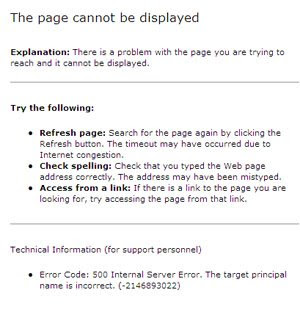
Go into the web listeners in ISA Management and change the certificate that ISA is using
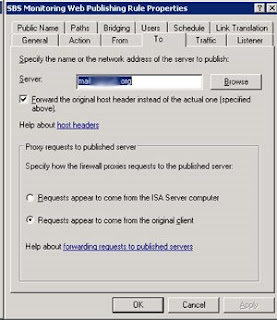
change the TO name in the web listeners (located in the firewall policies for each web publishing rule – SBS OWA web publishing rule, SBS Outlook via the internet web publishing rule, and several others) from publish.domain.local to mail.domain.com

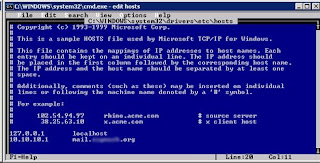
And you also need to create a host file entry that pointed mail.domain.com to the INTERNAL ip, when you ping it normally, it resolves to the external IP.
But there are some additional steps if you also have ISA 2004 on that machine. If you don't make the small, but necessary adjustments you get this error page:

Go into the web listeners in ISA Management and change the certificate that ISA is using
change the TO name in the web listeners (located in the firewall policies for each web publishing rule – SBS OWA web publishing rule, SBS Outlook via the internet web publishing rule, and several others) from publish.domain.local to mail.domain.com


And you also need to create a host file entry that pointed mail.domain.com to the INTERNAL ip, when you ping it normally, it resolves to the external IP.

Thursday, March 6, 2008
Adjustments needed to make a Bomgar box work on an XP Pro machine in a workgroup
I just got a Bomgar box, www.bomgar.com, and I wanted to keep track of the changes needed to make an XP Pro box in a workgroup work with Bomgar. Here are the simple instructions with a screen shot of what the final setting should look like:
click ‘Start’ >> ‘Run’ >> type ‘secpol.msc’, once the security policy tool opens, drill down to ‘Security Settings’ >> ‘Local Policies’ >> ‘Security Options’, and finally ‘Network access: Sharing and security model for local accounts’.
Set it to Classic so it looks like this:
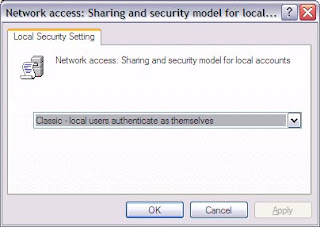
click ‘Start’ >> ‘Run’ >> type ‘secpol.msc’, once the security policy tool opens, drill down to ‘Security Settings’ >> ‘Local Policies’ >> ‘Security Options’, and finally ‘Network access: Sharing and security model for local accounts’.
Set it to Classic so it looks like this:

Sunday, March 2, 2008
Switching primary monitor on a laptop with an ATI video card
- Go to Start Menu->Control Panel.
- Either click on "Display" if present or "Appearance and Themes" then "Display" (if you are in category view).
- Click on the "Settings" tab.
- Click "Advanced".
- Click the "ATI Displays" tab (if this tab is not present you should update your video drivers).
- Switch the monitors labeled "1" and "2" by clicking the "1" where the "2" is selected or vice versa.
- Press "Apply" to apply your change.

Subscribe to:
Comments (Atom)