With XP antivirus 2012, you can use control-alt-delete to end task. Then run an rkill. Then run quick malwarebytes scan and remove everything, but don't reboot. Then run a full malwarebytes scan. You may find that the virus restarts even after an rkill after 3 or 4 minutes. Just close the program again and run an rkill and let the quick malwarebytes scan to keep the virus from restarting. Then run the full scan to completely get rid of the virus.
Thursday, June 30, 2011
removing XP Antivirus 2012
I've found XP antivirus 2012 to be easier to remove than most other of the fakealert viruses.

Friday, May 27, 2011
installing quickbooks 2010 Premier on a Win 2008 terminal server (32 bit)
Here's how I installed Quickbooks 2010 Premier on a Windows 2008 terminal server:
run "change user /install"
Install Quickbooks normally
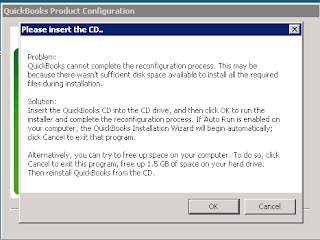
When you first run Quickbooks, it asks you to choose a specific edition, but I got this error:
After some research, I tried solution #2 here:
This resolved the problem, and I was able to choose a business specific edition.
Friday, May 6, 2011
using combofix in safe mode with command prompt
I was faced with a fakealert virus yesterday that existed in safe mode also, which made cleaning it very difficult. I used the command prompt method I used a couple weeks ago to clean it. Luckily, I was on a network - not sure I would have been able to do this on a stand alone computer. Here were my steps:
[on the virus affected machine]
boot into safe mode with networking
log in as a domain admin
create new local administrator (on the chance that I didn't know the local admin password)
[from another machine in the network that is not infected]
from another machine on the network logged in as a domain admin
go to \\10.0.0.54\c$ (affected computer drive)
create a new folder on the root of C called malware
download newest version of combofix and copy it to \\10.0.0.54\c$\malware
[on the virus affected machine]
reboot into safe mode with command prompt
log in as local administrator
run c:\malware\combofix.exe
You won't be able to install the recovery console, but in the two times I've tried this, it hasn't been a problem.
Thursday, May 5, 2011
Google Address Book "Connection to Google is temporarily unavailable"
By default, you get an error about the google address book not being able to sync when you open a Google Apps profile in Outlook. It looks like this:


This is fixed by enabling contact sharing in the Google Apps control panel. I guess this is some kind of global address list from what I'm reading.
Here's how you fix it:
- In the Google Apps control panel, click the Settings tab, then Contacts on the left side
- Select Enable contact sharing.
- Click Save changes.
And when fixed, it should work properly (though I've seen it not work - it makes little sense):
Wednesday, April 27, 2011
intermittent temporary freezes or pauses on Dell Latitude E4200
I've found some issues with intermittent temporary freezes/pauses on Dell Latitude E4200 laptops. But the hard part is that I've found no rhyme, reason, or consistency for the issue. It's certainly partly hardware related - but how? Here's what I know:
Windows will temporarily freeze every 5 to 10 minutes for 2 to 4 seconds. Keyboard and mouse will be unresponsive and the whole OS seems unresponsive during these short periods.
This problem ONLY happens when docked.
Twice, I have been able to narrow this problem down to hardware. In one case, a locally attached (via USB) Laserjet 2300DN and in another case a Logitech webcam. Once these objects were disconnected, the intermittent freezing stopped.
But I can't narrow it down to specific hardware all the time. For one user, he had nothing but the basics plugged in (USB keyboard, USB mouse, VGA monitor, ethernet). I got a different USB keyboard, USB mouse, and a different monitor (DVI this time). I also updated his BIOS and all other drivers. No effect. The intermittent freezing continued. I've seen this issue before and after the installation of Windows 7 SP 1 and with Symantec Endpoint Protection (separate rant on SEP forthcoming in a future blog post) and with MS Security Essentials.
I'm about to troubleshoot this again on another laptop. Interestingly, I've found this issue on 5 different Latitude E4200 laptops out of about 20 I have in place at various clients. So it's clearly not a universal issue. It's hard to troubleshoot because I have laptops with the exact same configuration not giving the same problem and the problem isn't easy to reproduce. If you have any experience with this issue, please feel free to leave a comment.
EDIT - I have resolved this on two laptops just by updating drivers. From the Dell web site, I updated the BIOS, video driver, mouse driver, and WLAN card driver. I'm not sure which one actually did it, but all the drivers should be up to date anyway.
Monday, April 11, 2011
handling windows restore fakealert virus
Today, I dealt with another one of those fakealert viruses. This one was called windows restore. I had to take a couple minor extra steps. I booted to safe mode with networking. I found that the virus had removed the DNS servers (which had been statically set on this computer). I added those back and was then able to download malwarebytes. One thing that was super weird was that it had hidden all files and folders. I ran start -> run -> iexplore to start IE, but I also unhid all files.
After running malwarebytes and removing the virus, I found that all files were still hidden. I ran this from a DOS prompt to remedy that:
attrib *.* -s -h /s /d
And things were back to normal.
Of course I ran these instructions to clean the virus:
Thursday, April 7, 2011
wireless autoswitch for disabling wireless on laptops when connected to the LAN
There's very little talk as far as I can about the problem of a wired laptop using its wireless connection even though it is actively wired. There is no scenario where you want your wireless to take precedence over your wired connection if both are available. But that is the default setting in Windows (wireless is preferred). And even if you make the wired connection the priority via this method:
If you're off the dock and not plugged in - and then sit back down at your dock, you'll still be wireless. I'm pretty sure it's also that way if you are wireless at home, put the laptop to sleep, and then come into the office and dock (wireless will take precedence). With Dell Latitude E Series laptops in ControlPoint, I found an option to disable the wireless when the wired connection is detected.
When working with a client's Toshiba Portege R600 who has very weak wireless within the office, I wanted to disable his wireless when wired but have it automatically re-enable when the wired connection is disconnected. I ended up using Wireless AutoSwitch XPV, which works exactly like I want it to. It's available here:
It costs $7.95 - which is a shame because it should be built into Windows.
Subscribe to:
Posts (Atom)